

SOLsearcher Cloud (SSC)
Secure, Scalable, and Cloud-Native Archive & eDelivery
SOLsearcher Cloud (SSC) is a robust, cloud-based electronic delivery and archiving solution designed to augment or replace traditional printing processes. Built natively for the Microsoft Azure Cloud ecosystem, SSC provides a secure, easy-to-use platform for distributing and accessing critical business documents via the internet. Whether you are a service provider hosting multiple clients or an enterprise streamlining internal workflows, SSC offers rapid deployment and seamless integration into your existing web portals.
- Deployment Wizard: Eliminate complex setups. The SSC Deployment Wizard handles all configuration and Azure resource creation—from server sizing to database allocation—ensuring a “no pre-setup” experience.
- Workflow Automation: SOLfusion automates the submission of files to the cloud, managing indexing, splitting, and storage processes without manual intervention.
- Multi-Tenant Capabilities: Ideally suited for service bureaus, SSC allows you to isolate customers or departments with separate databases and server resources within a single deployment.
- Instant Access: Users can quickly search vast archives to view, save, or print documents exactly as they appeared in the original print run.
- Granular Indexing: Utilizing the SDX Designer (a GUI-based Acrobat plugin), you can define precise indexing rules to extract content, including specific fields, paragraphs, and metadata.
- Native & PDF Support: While optimized for PDF, SSC supports the archiving and retrieval of native file types alongside associated JSON index information.
- REST API-First Design: Integrate SSC’s search and retrieval capabilities directly into your internal or customer-facing websites using a robust, well-documented REST API.
- Custom Branding: Easily configure the look and feel to match your corporate identity, including logos and labels, through the management interface.
The SOLsearcher Cloud Advantage
Traditional archiving solutions often become “open-ended science projects” with endless service costs. SSC changes the game:
- Wizard-Driven Setup: Configure your entire Azure environment—including Virtual Networks, Subnets, and Storage—in minutes using the Deployment Wizard.
- Containerized Architecture: Once configured, the system automatically deploys containerized applications to Azure, requiring minimal IT training or maintenance.
Security is paramount for transactional data. SSC leverages Azure’s best-in-class security infrastructure:
- Modern Authentication: Uses OpenID Connect and integrates natively with Microsoft Entra ID (formerly Azure AD), separating authentication from the application logic for enhanced security.
- Zero Trust Isolation: Each deployment creates specific Resource Groups and Virtual Networks, isolating resources and creating distinct security contexts for every client or department.
- Secure Gateway: An API Gateway acts as the single point of entry, aggregating backend services and enforcing strict policy and SSL termination.
SSC is designed to grow with your business, optimizing the balance between performance and cost:
- Auto-Scaling: The system automatically scales out by adding virtual machines or scales up by increasing resources based on real-time demand, including indexing servers that adjust to file queue volume and API servers that respond to incoming HTTP request levels.
- Cost Efficiency: Resources scale back down when demand creates a lull, ensuring you never pay for idle infrastructure.
- Tiered Storage: Utilize Azure Blob storage and Cosmos DB for high-performance retrieval while managing long-term costs.
SOLsearcher Cloud Architecture
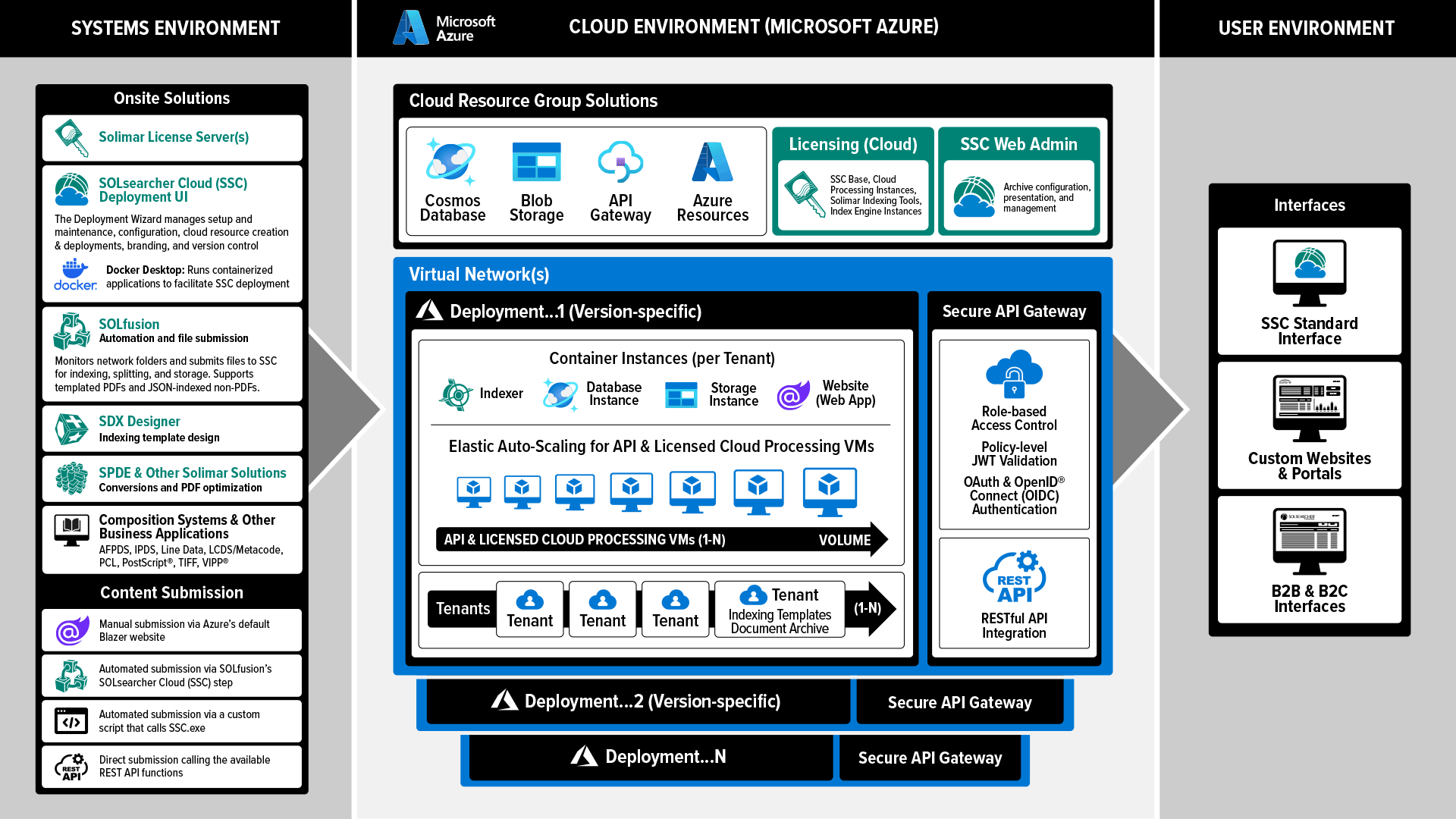
SSC operates within the Microsoft Azure cloud system, leveraging a modular design that ensures fault tolerance and high availability.
SSC Architecture Components
Deployment Wizard
Builds Azure resources, manages updates, and simplifies cloud implementation.
A local automation tool that watches network folders and submits files to the cloud for processing.
Indexing Servers
Processes incoming PDF and data files, extracting metadata and splitting records for storage.
API Gateway
The single-entry point for all traffic, routing requests to backend services and managing security policies.
Cosmos DB & Blob Storage
Stores JSON index data and physical files respectively, ensuring rapid retrieval and efficient storage.
SOLsearcher Cloud System Requirements
- OS:: Microsoft® Windows® 11 Pro, Windows Server 2019, Windows Server 2022, Windows Server 2025
- CPU:: Current generation Xeon or IntelCore, Quad Core
- RAM:: Minimum: 8 GB, Recommended: 24 GB or more
- HDD:: 6GB free disk space for software installation, formatted with Windows® NT File System (NTFS). Disk space requirements for processing data vary based on job size, volume, and application
- NIC: Ethernet network interface supporting the maximum speed of the network, preferably 1 Gb/s or greater
- USB Ports: 3 available ports required if using physical license keys
- Additional Software: Microsoft® .NET Framework 4.x (latest version) and .NET 8.x Desktop Runtime; they will be installed by the installation program if not found. The Net.tcp Port Sharing Service must be enabled. In addition, Docker Desktop 4.55+ will also need to be installed
- Note: Microsoft Message Queuing (MSMQ) must be installed if you are using SOLfusion with SOLsearcher Cloud.
- Note: The amount of memory listed above is the minimum for operation of the OS and the SOLsearcher Cloud Deploy application. More memory may be required, with the amount depending on the SOLfusion processing load and the size of input files. The maximum amount of memory that is supported by your operating system is always recommended. For additional recommended computer specifications, contact Solimar Systems or your local distributor.
- Azure: An active Microsoft Azure account is required. Please note, an active Microsoft or GitHub account is required for Microsoft Azure account creation
- Note: Solimar does not provide, configure, or manage customer Microsoft, GitHub, or Microsoft Azure accounts; clients are responsible for establishing and maintaining their own third-party accounts and associated access credentials
* A USB hub device can be used to increase the number of USB ports. USB ports are not required for any products using machine validation licensing.
- OS: Windows® 10 & Professional, Windows® 10 & Professional, Windows® Server 2016, Server 2019, Server 2022, Server 2025
- CPU: x64 2.4 GHz, Quad Core
- RAM: Minimum: 8 GB, Recommended: 24 GB or more
- HDD: 6GB free disk space for software installation, formatted with Windows® NT File System (NTFS). Disk space requirements for processing data vary based on job size, volume, and application
- NIC: Ethernet network interface supporting the maximum speed of the network, preferably 1 Gb/s or greater
- USB Ports: 1 available port required if using physical license keys
- Additional Software: Latest Microsoft® .NET Framework 4.X will be installed by the installation program if not found. Net TCP Port Sharing will be enabled. Also, Microsoft Message Queuing (MSMQ) must be installed if you are using SOLfusion with SOLitrack.
* A USB hub device can be used to increase the number of USB ports. USB ports are not required for any products using machine validation licensing.
- Please consult the requirements for your edition of Adobe® Acrobat® in addition to those listed below. In case of overlapping requirements, the higher value should be used. Adobe® Acrobat® is not included with SDX Designer. For licensing information, see Adobe Systems at https://www.adobe.com/.
- OS: Windows® 10 & Professional, Windows® 11 & Professional, Windows® Server 2016, Server 2019, Server 2022, Server 2025
- CPU: 2.4 GHz
- RAM: Minimum: 2 GB
- HDD: 1GB free disk space for software installation, formatted with Windows® NT File System (NTFS)
- NIC: Ethernet network interface supporting the maximum speed of the network, preferably 1 Gb/s or greater
- USB Ports: 1 available port required if using physical license keys*
- Additional Software: Adobe® DC 64-bit, Standard or Professional edition; Microsoft® .NET Framework 3.5 & 4.7.1
- Note: SDX Designer will not work with Adobe® Reader
* A USB hub device can be used to increase the number of USB ports. USB ports are not required for any products using machine validation licensing.