




Three Automation Wins with Practical JDF
JDF in practice can be a powerful tool to support automation in your print workflow. Let Solimar show you how to win with JDF in your print workflow!
Solimar Print Director Enterprise (SPDE)
The Solimar® Print Director® Enterprise (SPDE) is a set of programs designed to turn your computer into a powerful enterprise output management system. SPDE connects host computers to production printers that, under normal circumstances, cannot interface with each other. For example, SPDE can be used to connect midrange or mainframe hosts and networks to one or more printers and archive systems.
SPDE allows you to print from multiple host computers to multiple printing devices simultaneously. It can also perform multiple conversion routines on each print file. By supporting combinations of inputs, outputs, and conversions, SPDE gives you a powerful print manager that transparently connects your host systems with the production printers your company needs. As your requirements grow, you can add software modules, install additional inputs and outputs, or upgrade to take advantage of new features and capabilities.
The power of SPDE lies in its ability to interface with virtually any host or printer. Moreover, its processing control, conversion routines, and job management capabilities allow a very high degree of control over your printing environment.
SPDE Base System
Unique and integrated modules that work together to provide sophisticated print control and job management
SPDE Connectivity Modules
Connects and communicates with a wide range of hosts, networks, devices, printers, viewing and archiving systems.
SPDE Conversion Modules
Powerful print stream transforms automatically convert datastreams and resources for virtually any target device
SPDE Queue Management
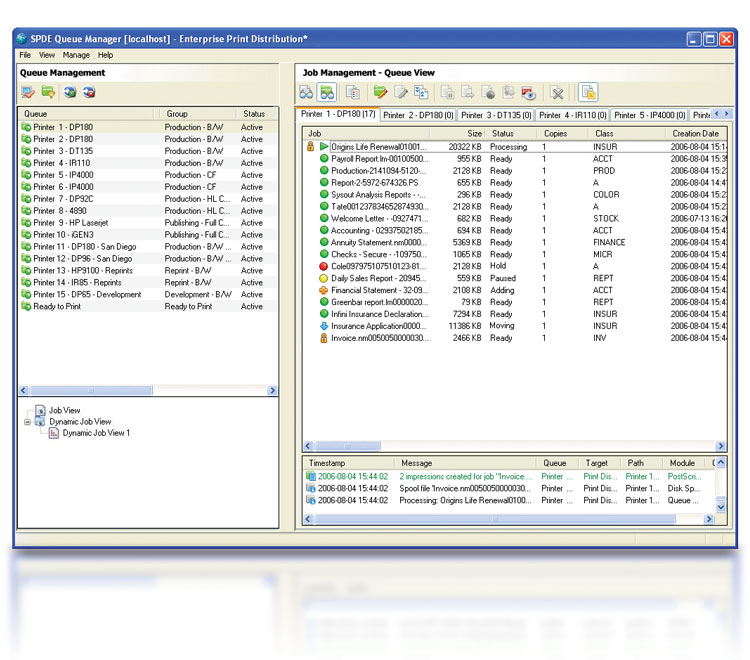
The Queue Manager provides a streamlined UI for print operators. The consolidated view allows print operators to monitor and control print queues and jobs. This allows operators to initiate and halt job processing, reorder and move jobs between queues, handle reprints, interventions, preview PDF files, and more based on the security rights assigned to them.
The Queue Manager’s highly customizable UI allows the operators to create “views” that organize the queues and jobs according to the operator’s preferences, and filter messages based on user-defined rules. A queue window can be opened for each logical queue and multiple queues can be grouped together for management within one window.
Key Management Features
Automatic Routing
Automatic job routing is accomplished with the use of user defined Job Filters. SPDE supports over twenty Job Filters that can be used to control how jobs are processed and routed based on conditional logic. All the routing possibilities are up to the user’s imagination and production needs. Common configurations include routing jobs based on file size, job name, form type, pages, and class.
AutoStart Commands
SPDE is able to automate start command selection. Based on job names or information in the data, start commands can be invoked by several modules. Automating start commands reduces operator error, streamlines production, and eliminates the need to manually enter commands on the printer for different types of jobs.
Bookmaking
The Bookmaking features of SPDE enable print jobs to be organized in Queue Windows using a drag-and-drop interface. Files may originate from different hosts and applications. SPDE can convert different types of files into a common format. Once organized as desired, jobs can be submitted directly to the output device or appended together into one file.
Drag & Drop
When SPDE controls multiple printers, the Drag-and-Drop feature makes it easy to move jobs from one printer’s queue to another. This is useful if a printer becomes unavailable, if you want to send the same job to two or more printers, or if the queue for a printer is long and you need a job printed immediately. The feature also supports file dragging and dropping between Windows Explorer and queue windows.
File Naming
Several modules of SPDE are able to extract and include information in file names that can be used for job management. Common uses for job naming include automating job routing and processing, filling accounting logs with charge-back information, and identifying files for operators in Queue windows.
Job Separation
SPDE is able to parse a single print report into multiple jobs based on user-defined page count and logical rules. Common uses include: distributing and load balancing a single large report to multiple printers, submitting sub-documents to archive systems, enabling printers to start printing large jobs before receiving the last page, and automatic distribution to network printers or remote locations.
Job Tracking
SPDE displays information about all jobs processed and can generate two types of message logs to store job tracking information. For data that is converted, Accounting messages are generated showing the job’s page count and name. General messages include the job name, where it was received from and where it was sent. Both types of message logs can be stored to disk on a daily, weekly, or monthly basis.
Search & Replace
The Data Converter Module enables data to be modified on-the-fly at or before runtime. Users define the “search and replace” operation of the Data Converter Module, making it extremely flexible and powerful. Common uses are adding signatures, making data unprintable, correcting coding errors, and modifying VIPP®, PostScript, PCL, and DJDE information.
Reprints
SPDE’s Set Start/Stop Point provides a way to view files and specify the range of pages to resubmit to the printer. The Job Separator can be used to parse large jobs into smaller segments so pieces of a job can be resubmitted for print. A range of pages to be reprinted can be specified directly from IPDS, AFP, PostScript and Metacode spool files. And, SPDE can also store jobs for a specified amount of time for temporary or permanent archive and retrieval for reprint.
Load Balancing
Central queue management with SPDE includes support for load balancing output among several devices simultaneously. Jobs can be submitted to the next available printer, large jobs can be parsed and “balanced” between multiple printers, and logical rules can be defined to control routing.
Timed Release
The Timed Release and Delayed Job Entry options enable jobs to be processed at a specified time and interval. The options are useful for archiving files after printing, then automatically deleting them after a certain time. The options can also be used to establish priorities for different types of jobs.
User-Friendly GUI
The interface for SPDE is highly intuitive and user-friendly. There is no programming or scripting required to configure the many features. The interface minimizes implementation time and enhances print operations with a comprehensive and easy to understand focal point for central job management.
Integrated Operator & Queue Security
The security system in SPDE’s System Manager allows administrators to set rules that limit access and actions for the objects in a configuration and to determine what interfaces are available to each user. Most commonly, administrators will define and manage workflow rules with the System Manager and operators will only have access to the Queue Manager for controlling and monitoring job workflow.
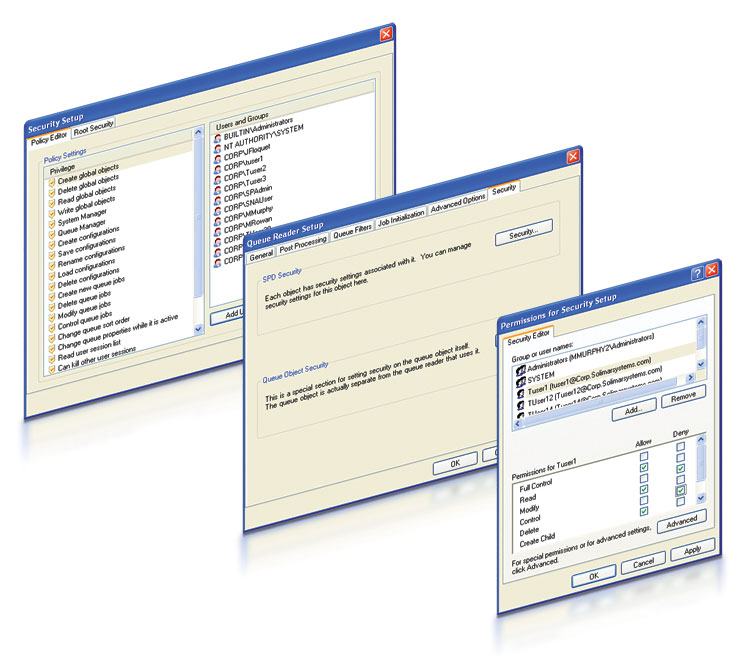
Granular security enables administrators to control who can do what in the system for every module in a configuration based on their login credentials. For instance, an administrator could prevent a group from accessing a job queue, prohibit a user from making configuration changes, and allow others to fully control some queues, but only monitor processing activity for others, and deny access to others.
Using queue security enables administrators to set up a workflow to track operator activity. If an action performed by a user is denied because of insufficient policies or permissions, the event will be logged in the Windows Event Viewer.
SPDE supports the configuration of administrator and operator policies, privileges and access rights. Security controls may be set at a system-wide level or individual module levels to determine what settings and interfaces are available to each user.
SPDE System Specifications
- OS: Windows® Server 2016, Server 2019, Server 2022, Server 2025, Windows® 10, Windows® 11. NOTE: 64 bit only.
- CPU: x64 2.4 GHz, Quad Core
- RAM: Minimum: 8 GB, Recommended: 24 GB or more
- HDD: 6GB free disk space for software installation, formatted with Windows NT File System (NTFS). Disk space requirements for processing data vary based on job size, volume, and application
- NIC: Ethernet network interface supporting the maximum speed of the network, preferably 1 Gb/s or greater
- USB Ports: 1 available port required if using physical license keys*
- Additional Software: The latest Microsoft® .NET Framework 4.x, Microsoft Message Queuing; these will be installed by SPDE installer if not found
- ReadyPDF: With the addition of ReadyPDF to an existing SPDE server, it is possible that applications may require additional resources in order to handle the additional load and run the software. ReadyPDF requires an additional interpreter license in order to run the module. In general, Solimar suggests that users equip SPDE servers with one core per licensed interpreter and an additional 4+ GB RAM per interpreter instance. In order to determine an appropriate amount of RAM, Solimar recommends that users evaluate the resource utilization and performance of their applications on existing SPDE servers, and expand available resources as they believe necessary to meet processing objectives. Solimar recommends that users install, test and evaluate applications and workflows in a non-production test/development environment before using the software in production
For optimal performance, we suggest:
- Note: Systems that process PostScript, PDF, very large files, or many workflows may require additional memory that can only be supported on a 64-bit operating system.
- One 2.0+ GHz CPU core per printer
- 64-bit OS with 4 GB or more RAM per interpreter instance
- 100+ GB HDD, 15K RPM minimum
- Solid State Drive (SSD) recommended for optimum performance
- Note: Some workflows may require additional hard drives. Please contact Solimar Systems for recommended specifications.
- OS: Microsoft Windows® Server 2016, Server 2019, Server 2022, Server 2025, Windows® 10, Windows® 11
- CPU: 2.4 GHz
- RAM: 4 GB minimum
- HDD: 500MB free disk space for software installation
- NIC: Ethernet network interface supporting the maximum speed of the network, preferably 1 Gb/s or greater
- Additional Software: The latest Microsoft® .NET Framework 4.x will be installed by SPDE installer if not found
- OS: Microsoft Windows® Server 2016, Server 2019, Server 2022, Server 2025, Windows® 10, Windows® 11
- CPU: 2.4 GHz
- RAM: 4 GB minimum
- HDD: 350MB free disk space for software installation
- NIC: Ethernet network interface supporting the maximum speed of the network, preferably 1 Gb/s or greater
- Additional Software: The latest Microsoft® .NET Framework 4.x will be installed by SPDE installer if not found