


SOLindexer - Data Indexing
SOLindexer is a suite of PDF indexing tools for Adobe® Acrobat® and Reader® that provides an easy to use method for rapidly locating relevant information within transactional PDF documents. SOLindexer is comprised of two components: SDX Designer to visually define index fields, and SOLfinder™ plug-in user interface to search indexed documents. Note: SOLfinder™ installs separately from the Solimar Indexing Tools installation.
Solimar Indexing Tools teams with Rubika® and the Solimar® Print Director® Enterprise (SPDE) to provide advanced PDF manipulation capabilities.
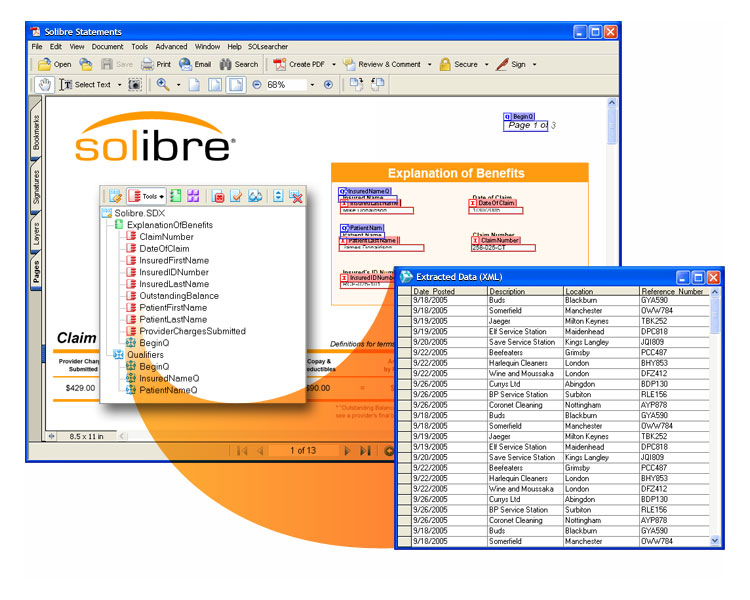
SOLindexer provide advanced PDF manipulation capabilities:
- Indexing Automation
- Splitting to facilitate PDF archiving
- Merging and sorting PDF content to achieve bulk mailing discounts
- Concatenation
- Automating insertion (enveloping)
- Automating finishing (paper selection and two-sided printing)
- Adding forms and opaquing sensitive data
SOLindexer Components and System Requirements
SDX Designer is used to define templates that identify the information in a PDF document that is to be indexed. The resulting indexes are associated with key words, such as “Account Number” or “Client Name”, to facilitate the search process. In addition, SDX Designer allows users to qualify the indexing process so that only relevant information is captured.
- Indexes PDF documents with searchable text
- Defines an unlimited number of index fields
- Allows index creation based on file name
- Relates index fields to other fields
- Includes predefined index formats
- Allows user defined index definitions
- Defines user assigned index field names
- Qualifies index fields prior to processing
- Tests user defined index definitions
- Includes a user-friendly GUI
- Defines report separation fields
SOLfinder recognizes index fields created by SOLindexer and allows the user to search PDF files quickly and easily for information using familiar key words. SOLfinder can also print subdocuments of a report or extract them to a separate PDF document.
- Provides rapid display of search results
- Sorts search results by page and data
- Displays individual and multiple reports in search results list
- Extracts selected reports into new PDF
- Prints selected reports or pages
- Displays all index fields as search options
- Supports logical search criteria:
- Equals
- Greater than / Less than
- Contains
- Begins with
- OS:Windows® 10 & Professional, Windows® 11 & Professional, Windows® Server 2016, Server 2019, Server 2022, Server 2025
- CPU: 2.4 GHz
- RAM: Minimum: 2 GB
- HDD: 1GB free disk space for software installation, formatted with Windows® NT File System (NTFS)
- NIC: Ethernet network interface supporting the maximum speed of the network, preferably 1 Gb/s or greater
- USB Ports: 1 available port required if using physical license keys*
- Additional Software: Microsoft® .NET Framework 3.5 & 4.7.1
- Note: Systems that execute indexing and Rubika® processes in SOLfusion™ do not require Adobe® Acrobat®.
- Note: SOLfinder requires Adobe® Acrobat® or Adobe® Reader
* A USB hub device can be used to increase the number of USB ports. USB ports are not required for any products using machine validation licensing.
- Please consult the requirements for your edition of Adobe® Acrobat® in addition to those listed below. In case of overlapping requirements, the higher value should be used. Adobe® Acrobat® is not included with SDX Designer. For licensing information, see Adobe Systems at https://www.adobe.com/.
- OS: Windows® 10 & Professional, Windows® 11 & Professional, Windows® Server 2016, Server 2019, Server 2022, Server 2025
- CPU: 2.4 GHz
- RAM: Minimum: 2 GB
- HDD: 1GB free disk space for software installation, formatted with Windows® NT File System (NTFS)
- NIC: Ethernet network interface supporting the maximum speed of the network, preferably 1 Gb/s or greater
- USB Ports: 1 available port required if using physical license keys*
- Additional Software: Adobe® DC 64-bit, Standard or Professional edition; Microsoft® .NET Framework 3.5 & 4.7.1
- Note: SDX Designer will not work with Adobe® Reader